Icon of program: Advanced Find and Replace

Advanced Find and Replace for Windows

  • Trial version
  • 2.5
    3
  • 854
  • V2.0
Download for Windows

View an ad to download for free

Replace text in multiple code pages simultaneously

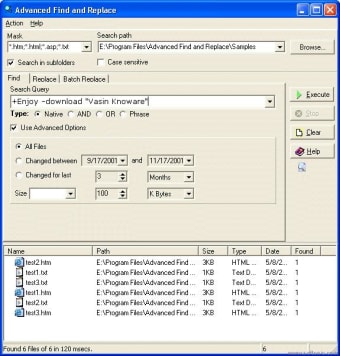
Advanced Find and Replace is useful for anyone that needs to find and replace text in either lines of text whether code or word processing documents. You can even search for symbols such as full stops, commas and brackets.

Top Recommended Alternative

You can look for any word, phrase, chain of characters or document text fragment at the same time recurring in multiple documents. The results of the search are displayed in an easy to read practical list in the interface of the program. Not only that, but it also allows you to insert new texts, eliminate them and replace them quickly and simply.

This is a really useful program for anyone that's made a huge error in a large amount of documents or simply needs to keep a certain number of documents constantly updated. The only problem is that it cannot search PDFs so don't rely on it for any documents in that format.


  • Pros

    • Saves time in replacing and deleting multiple words
    • Very fast and efficient
  • Cons

    • Cannot search PDFs
    • Cannot search network drives
 0/1

App specs

  • Developer

  • License

    Trial version

  • Version

    2.0

  • Latest update

  • Platform

    Windows

  • OS

    Windows 95

  • Language

    English

  • Downloads

    854

    Last month's downloads

    • 6
  • Size

    790.67 KB

Program available in other languages


Icon of program: Advanced Find and Replace

Advanced Find and Replace for PC

  • Trial version
  • 2.5
    3
  • 854
  • V2.0
Download for PC

View an ad to download for free


User reviews about Advanced Find and Replace

Have you tried Advanced Find and Replace? Be the first to leave your opinion!

Add review

You may also like

Alternatives to Advanced Find and Replace

Explore Apps

Latest articles

Laws concerning the use of this software vary from country to country. We do not encourage or condone the use of this program if it is in violation of these laws.
Softonic

Is Advanced Find and Replace safe?

Score result: Clean

This file passed a comprehensive security scan using VirusTotal technology. It is safe to download.

  • Virus free
  • Spyware free
  • Malware free
  • Verified by Security Partners

    VirusTotal logo

Scan Info

Last scan
Wednesday, December 2, 2020
Scan provider
VirusTotal

Softonic security commitment

Advanced Find and Replace has been thoroughly scanned by our advanced security systems and verified by industry-leading partners. This file comes from the official developer and has passed all our security checks, showing no signs of viruses, malware, or spyware. For more information, visit our Security and Trust Center

Signed in to Softonic as